
Record once.
Schedule it.
Get briefed on Telegram.

Mochi Web Agent is a no-code web automation tool for Windows. Record your steps — navigate, click, fill, collect — schedule them to run automatically, and receive AI-summarized results straight to your Telegram. Trigger any scenario on demand from Telegram too. No coding required.

Mochi
Free to Start · AI-Summarized · Telegram Alerts

😺 Clean. Simple. Yours.

Everything you need in one window — no clutter, no coding.
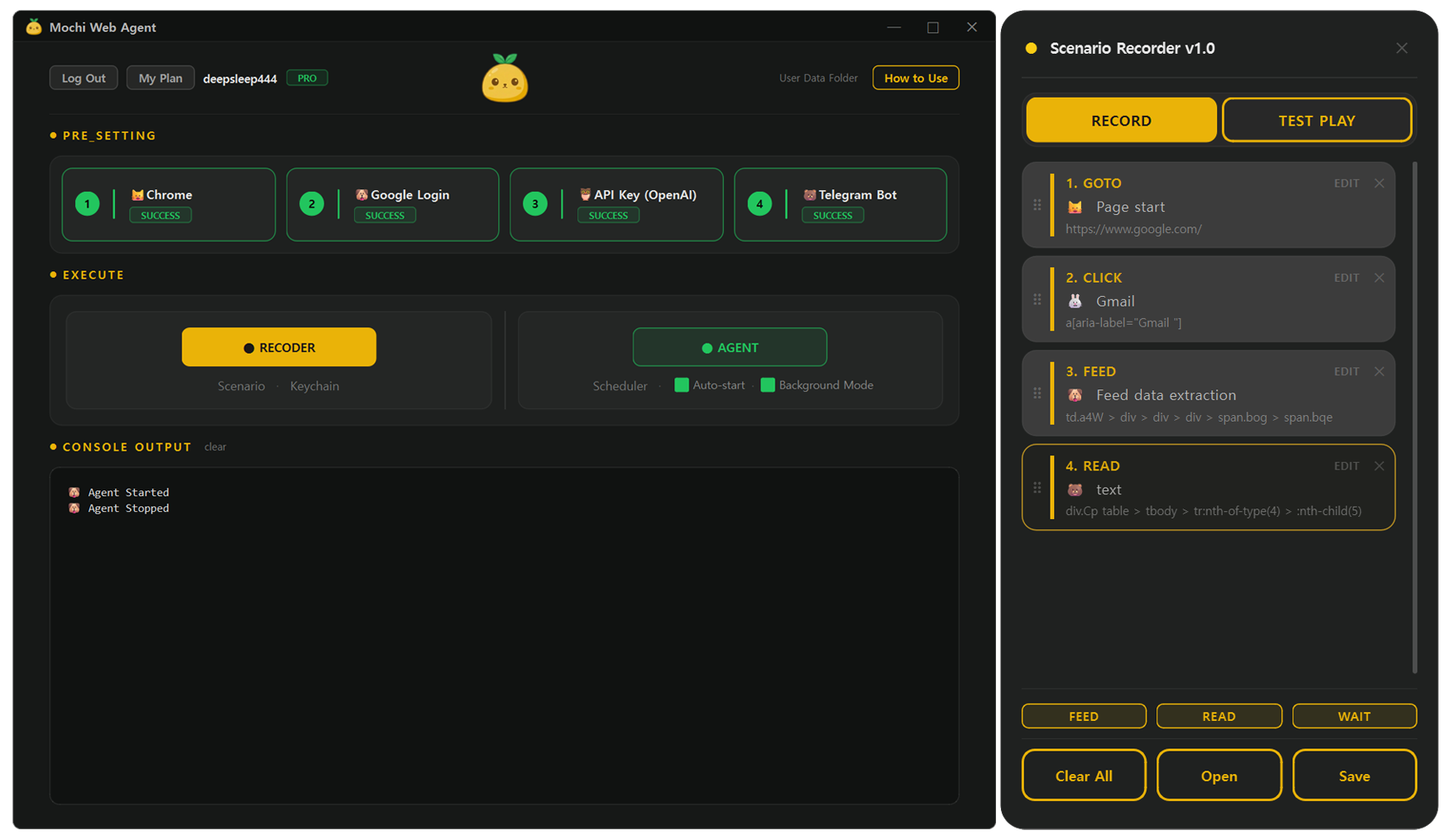
Mochi App Screenshot

🐻 See it in action.

Watch how Mochi Web Agent records, schedules, and delivers results to your Telegram.

🦉 Three steps. That's it.

Once set up, a new automation takes under 3 minutes to record and schedule.

STEP 01

Record

Open Mochi Web Agent and perform your steps in Chrome — navigate to a page, click a tab, fill a search box, then point at the data you want to collect. Mochi Web Agent records each action exactly as you perform it: navigate, click, fill, collect.

STEP 02

Schedule

Set a daily, weekly, or interval schedule and run a quick test to confirm it works. Mochi Web Agent runs your scenario automatically in the background — even while you sleep.

STEP 03

Receive & Command

Results land in your Telegram automatically — AI-summarized and ready to read. Or trigger any scenario on demand directly from your phone. Your Telegram is both inbox and remote control.

FEED

Collect posts, news & listings

Point Mochi at any page — job board, news site, forum — and it captures every post title and link. Your AI agent summarizes the results and pushes them to Telegram on your schedule.

  • Scrapes any repeating list with one click
  • Extracts post text + URL — no code, no API
  • AI-written summary lands in Telegram automatically
READ

Monitor any value on any website

Capture the exact current value of any element on a page — a price, balance, or status — and send it to your Telegram on schedule. No more manual checking.

  • Track prices, balances, and stats automatically
  • Snapshot any text or number on any page
  • Schedule checks every hour, day, or week

🐰 What can you automate?

The things you'd check every day — if only it wasn't such a hassle. If it's visible in Chrome, record it once.

Sports & Gaming
League Standings & ResultsFEED

Follow NFL, NBA, EPL, MLB, F1 and more. Latest standings to Telegram every morning.

daily
Game Patch NotesFEED

Latest patch notes and leaderboard updates delivered to Telegram automatically.

daily
PC Game DealsFEED

Daily digest of discounted titles from any gaming platform sale page.

daily
Entertainment & Lifestyle
New Releases on StreamingFEED

Weekly digest of what's just dropped on any streaming platform — straight to Telegram, no browsing required.

weekly
Favorite Creator UpdatesFEED

Latest uploads or announcements from any creator's channel or official site, delivered to Telegram on schedule.

daily
Community Hot PostsFEED

Top posts and links from any forum or community — subreddits, discussion boards, niche communities — without doomscrolling.

daily
Market & Finance
Market BriefingREAD

Latest prices and figures from your favorite finance site, clean summary in Telegram.

every hour
Crypto PortfolioREAD

Current balance and holdings from your exchange — no API key needed.

daily 7 AM
Ad Budget CheckREAD

Remaining ad budget from any platform dashboard before you start work.

daily 9 AM
Shopping & Jobs
Daily Deals DigestFEED

Current deal list from any shopping site, AI-summarized and sent to Telegram every day.

daily
Wishlist Price WatchREAD

Current price on any product page, reported on schedule without manual checking.

daily
New Job ListingsFEED

Morning digest of new listings from your pre-filtered job search page.

daily 8 AM
Flight Price WatchREAD

Lowest price on your saved route from any flight comparison site.

every hour
Personal & Productivity
Email Inbox SummaryFEED

Subject lines and links of unread emails delivered to Telegram without opening a browser.

daily 6 PM
Weather & Air QualityREAD

Temperature, rain chance, and air quality from whichever weather site you prefer.

daily 6 AM
Subscription & Account StatusREAD

Billing page, usage meter, or plan status from any service dashboard — so you're never caught off guard.

weekly
Content & Research
Industry News FeedFEED

Today's headlines and links from any news page, AI-summarized to Telegram.

daily
Competitor UpdatesFEED

Latest posts from a competitor's blog, product page, or press releases — every morning without visiting their site.

daily

🐋 Your API costs stay under $1/month

Mochi Web Agent runs your scenarios as deterministic scripts — the same recorded steps, every time. AI is only used for routing and the final summary (1–2 calls per run). Since it uses your own OpenAI API key, 100 automations a month costs under $1. No surprises, no markup.

< $0.01

per run in API fees — every single time you run it

Other AI agents Mochi Web Agent
How it runsLLM decides every clickYou record the steps once
ReliabilityUnpredictable resultsSame result, every time
Cost per run$$$< $0.01
AI usageEvery stepSummary only (1–2 calls)

🐶 Start free. Upgrade when you need more.

Free
$0 / forever
Up to 3 scenarios

Upgrade to Pro is available inside the app, powered by Paddle.

Q. Will it interfere with my work while running?+
Not at all. Mochi Web Agent runs a real Chrome browser — not a headless bot — so it works naturally on sites that block automation. The browser is sent completely off-screen while it works, so your desktop stays uninterrupted. You won't see it, hear it, or feel it — until the result lands in your Telegram.
Q. Can I trigger a scenario manually from Telegram?+
Yes. In addition to scheduled runs, you can send a message to your Telegram bot to trigger any scenario on demand — directly from your phone, anytime.
Q. How long does it take to set up an automation?+
Initial setup — connecting your Google session, OpenAI API key, and Telegram bot — takes a few minutes and only needs to be done once. After that, simple scenarios can be recorded, tested, and scheduled in under 3 minutes. No coding involved at any step.
Q. How much does web automation cost with Mochi Web Agent?+
Mochi Web Agent uses your own OpenAI API key. Each run triggers just one AI call for the final summary — costing less than $0.01. Running 100 automations a month typically costs under $1 in API fees, paid directly to OpenAI at cost. If you're looking for a cheap web automation tool, web scraping under $1/month is realistic with Mochi.
Q. Does Mochi Web Agent use AI for every step?+
No. The scenario itself — navigating, clicking, filling, collecting — runs as a deterministic browser automation script with no AI. AI is only used at the end: once to summarize the collected data (and once more for routing if you trigger via Telegram bot). That's 1–2 calls per run, total.
Q. What websites can it automate?+
Most websites that open in Chrome. If you can see the data in your browser, Mochi Web Agent can collect it on a schedule. Sites with aggressive bot protection or heavy security layers may not be compatible.
Q. How is this different from other automation tools?+
Most automation tools are built for developers. Connecting APIs, designing flows, configuring nodes — even tech-savvy users spend hours just getting started. Mochi Web Agent is different: if you can browse a website, you can automate it. Just open Chrome, click through the steps you want to repeat, and you're done. It's a no-code browser recorder for Windows — schedule web scraping without writing a single line of code. No API knowledge, no flow design, no coding — ever. And because AI is only used for the final summary, the running cost is a fraction of AI agent alternatives.
Q. Is Telegram delivery included in the free plan?+
Yes. The free plan lets you create up to 3 scenarios — each one can be scheduled and will send results directly to your Telegram at no extra cost.
Q. Do I need to keep my PC on?+
Yes. Mochi Web Agent runs locally on your Windows PC, so the machine needs to be on for scheduled automations to run.
Mochi

Start automating in minutes.

Free plan.
Your first automation takes under 3 minutes to set up.

GET STARTED